

AI photo editing is becoming extremely popular on social media, especially on Instagram, Facebook, and YouTube. Nowadays, people love transforming their normal photographs into amazing cinematic pictures using Artificial Intelligence. One of the latest eye-catching trends is Sheru Bhai Photo Editing with ChatGPT, featuring a stylish person standing beside a giant royal white lion.This creative photo-editing trend is attracting attention because of its unique combination of luxury, attitude, royal fashion, and realistic AI effects. Many content creators are sharing these beautiful pictures on Instagram to make their profiles more attractive and creative.
What Is Sheru Bhai AI Photo Editing?
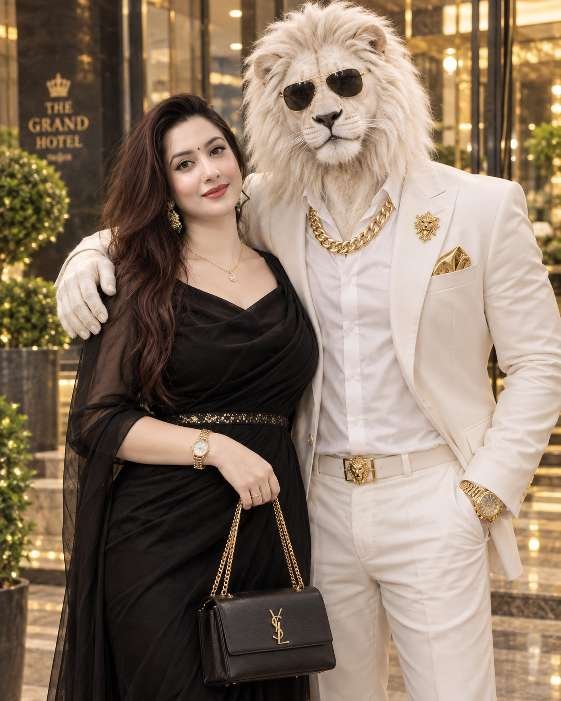
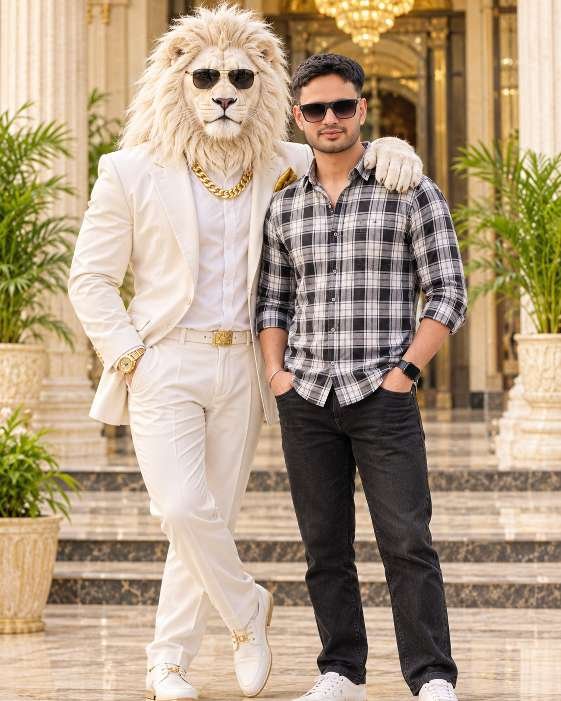
Sheru Bhai AI Photo Editing is a creative photography trend in which an ordinary photograph is transformed into a cinematic royal-style portrait. The main attraction is a giant white lion standing beside a person like a loyal friend or royal bodyguard.The lion usually wears a premium white formal suit, stylish black sunglasses, a heavy golden chain, and a luxury wristwatch. The person also appears in fashionable clothing while standing confidently beside the lion.This unique combination creates a powerful and impressive photograph that looks like a professional cinematic photoshoot.
Why Is the White Lion Photo Editing Trend Going Viral?
The white lion trend is becoming popular because people enjoy creating extraordinary pictures that look different from ordinary selfies and portraits.Social media users love the royal appearance, realistic lion character, luxury backgrounds, and cinematic photography effects.Some popular features of this trend include:
- Giant white lion with realistic fur.
- Premium white royal suits and golden accessories.
- Luxury palace and hotel backgrounds.
- Stylish sunglasses and attractive poses.
- Professional DSLR-style photography.
- Cinematic lighting and realistic shadows.
These elements make the photographs visually attractive and suitable for social media sharing.
How ChatGPT Makes AI Photo Editing Easier
ChatGPT makes creative photo editing easier for beginners as well as experienced content creators. Users can upload their photographs and describe the type of image they want to create.AI image generation can help transform an ordinary photograph into a completely different creative scene. For example, someone can create a royal palace portrait, a luxury hotel photoshoot, or an impressive picture with a giant white lion.The process is simple and does not require expensive cameras, professional photography studios, or advanced editing knowledge.However, AI-generated results may sometimes change small facial details, clothing patterns, or other parts of the original photograph. Therefore, checking the final image is always important.
Create Amazing Royal White Lion Photos
One of the best things about this trend is that everyone can explore different creative styles. Men can create stylish royal portraits with a white lion, while women can experiment with elegant black dresses, beautiful jewellery, and luxury backgrounds.Couples can also create matching AI photographs with the same white lion character.For an impressive result, choose a clear original photograph with good lighting and a visible face. A simple background and a natural pose can also help produce an attractive final composition.
How to Create Sheru Bhai AI Photos Using ChatGPT
Creating this amazing photo is simple. You do not need professional photography skills.
Follow these steps: ⬇️
- Open ChatGPT on your mobile or computer.
- Upload your original photograph.
- Copy and paste a suitable AI photo-editing prompt.
- Ask ChatGPT to create a realistic white lion beside you.
- Generate your image and save the result.
Final Word
The Sheru Bhai AI Photo Editing Trend is a fun way to turn ordinary photographs into extraordinary royal portraits. With ChatGPT and the right prompt, you can create your own cinematic white lion photos in just a few simple steps.Try this trend, create your royal AI portrait, and share your favourite creation on Instagram!